macOS Server for Managing Apple Devices
macOS Server provides administrative tools that extend how users manage devices, files, and network features within the Apple ecosystem. This software supports centralized setup options for small teams, classrooms, and home labs that want a simple way to configure connected devices. Its design favors ease of use, offering a more approachable alternative to complex server platforms.
The tool focuses on streamlining basic management tasks rather than delivering full enterprise capabilities. This direction works well for users who prefer a clear interface that guides them through essential server administration features. The simplified structure can also serve individuals who are experimenting with a Mac-based server solution for the first time.
What does macOS Server offer?
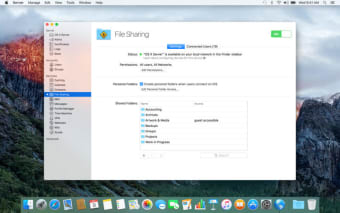
The software historically provides tools such as file sharing, network configuration, and device management. These areas help users maintain organized storage spaces, coordinate shared folders, and distribute settings across supported Apple devices. The lightweight approach stands out as a strength since it reduces the need for specialized training or extensive server knowledge.
Its practicality appeals to classrooms or small offices where users want straightforward access to network management functions. However, the remaining feature set has grown more limited over time, which creates constraints for users who need broader administrative capabilities. This narrower focus keeps the tool accessible but can limit flexibility when managing more complex environments. Administrators can use macOS Server to support tasks such as network backup coordination or shared resource management. These functions help maintain organized digital environments and improve collaboration within smaller teams. The tight integration with the Apple server software ecosystem also enhances consistency when working across multiple Apple devices.
Despite its usability benefits, the software’s dependence on Apple hardware represents a constraint for mixed environments that require broader compatibility. Its scaled-back toolset can also lead some organizations to rely on additional services when they need advanced or customizable solutions.
A Simple Server Tool for Apple-Focused Setups
macOS Server offers an approachable way to support device and file management within Apple-centric spaces. Its streamlined tools help users handle essential administrative tasks without overwhelming complexity. Although its limited scope reduces its suitability for larger infrastructures, the software remains a practical option for smaller groups that want simple and consistent server features built around the Apple ecosystem.